Posts

Review of Gunnar Optics - Glasses for software engineer

Image
I'll start my review with a saying that each software engineer has to make breaks while working with computer screens. By Ukrainian legislation this break is set to 15 minutes/hour. I believe that this make sense no matter how good your LCD/LED screen is. So what are the problems with our screens are? Firstly , the problem with these(LCD/LED/CRT) screens is that they do produce light, but humans are used to look at objects there light is reflected (yes, this is all objects except our screens :) for a millions? of years. Reflected Light  E-Ink screens use reflected light technique, I will write about my Amazon Kindle 3(which have latest generation of E-Ink screen) experience a bit later. Secondly , as for me that main problem is with eye's muscles. They are focused on one distance and this is not good. There is little that any glasses can do to overcome that limitation. But first things first. So here are the glasses and my personal review. Gunnar's ...
WCF RIA: Connecting DataPager with Silverlight DataGrid to perform optimized paging on sever side.

Silverlight and WCF RIA Services are aimed to provide easy CRUD operations. And this is often the case. One problem I have been facing is paging in DataGrid + DataPager. Generally all works well, but there might be the case when you need to optimize this one. What we aim to do is having paging support without writing any custom code on the client(silverlight). We can bind DataPager by this command   < sdk : DataPager  Height = "26"  HorizontalAlignment = "Left"  Margin = "8,54,0,0"  Name = "dataPager1"   PageSize = "10"  VerticalAlignment = "Top"  Width = "213"  Source ="{ Binding  Data ,   ElementName = amazonOrderDomainDataSource } "  DisplayMode = "FirstLastPreviousNext"  TabNavigation = "Local"   DataGrid binds to the same DataSource < sdk : DataGrid  AutoGenerateColumns = "False"  Height = "195"  HorizontalAlignment = "Left"  ItemsSource =...

Cannot sort Silverlight DataGrid time column

I have run into one problem while working on Silverlight DataGrid sorting functionnality. There was a problem of sorting DateTime column. In order to enable sorting for ordinary columns in Silverlight DataGrid control all you have to do is simply add CanUserSort = "True to the definition of the column < sdk : DataGridTemplateColumn  x : Name = "timeColumn"  Header = "Time"  Width = "Auto"  CanUserSort = "True" > This works perfectly for ordinary fields(like integers). But for the DateTime type it does not work. And solution for this is to add jet another parameter SortMemberPath = "Time"  > And now this works!   < sdk : DataGridTemplateColumn  x : Name = "timeColumn"  Header = "Time"  Width = "Auto"  CanUserSort = "True"   SortMemberPath = "Time"  >                      < sdk : DataGridTemplateColumn.Ce...

Compare .NET objects or Why Assert.AreEqual fails for complex objects.

MS Unit Test and NUnit have method Assert.AreEqual(object o1, object o2). What they can do - is simply compare integers or strings, etc. But they do not compare complex object. I have used different code, but a lot of them do not correctly compare really complex objects(Like object with nested object, or list, or enum). The solution is to use  http://comparenetobjects.codeplex.com/  C# class. It is pretty simple one .cs file and it works! public static void CompareObjectValues(object o1, object o2, IEnumerable<string> elementsToIgnore) { var compareObjects = new CompareObjects(); compareObjects.MaxDifferences = 100; compareObjects.ElementsToIgnore.AddRange(elementsToIgnore); var comp = compareObjects.Compare(o1, o2); if (comp == false) { Assert.Fail(compareObjects.DifferencesString); } Assert.IsTrue(comp); }

Google and Windows Mobile Sync

Google unveiled a great functionality recently. It allows you to synchronize between your Windows Mobile and Google Mail, Calendar, Contacts. So nowadays there is no need to install Outlook to do that trick. Now Google configured their own Exchange server. So Mail, Calendar, Contacts can be synchronized. Currently Task synchronization is not supported. I tested it and it works really great! PS: Please go to Schedule in Active Sync and check whether it is appropriate for you to have auto connect, because you may be charged for connection. The default setting is set to auto connect, so please note that. And here is a link from Google. http://www.google.com/support/mobile/bin/answer.py?answer=138636&topic=14299

How to Remove Dots (=Spaces) and Arrows (=Tabs) in Visual Studio Editor?

Image
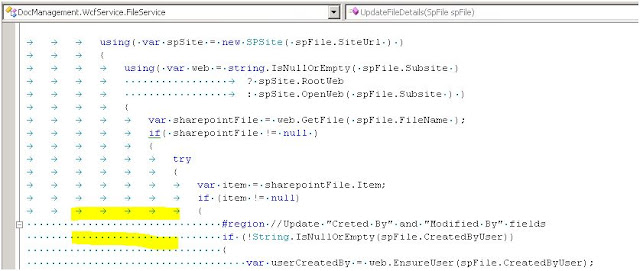
Sometimes you could see arrows(=tabs) and dots(=spaces) in your Visual Studio Editor. Now the nice question is how to remove them...? If you do search over the options you probably will not find a way how to do that. The solution is simple but hidden. Just press CTRL R CTRL W in your Editor. That's it.

Format Currency Sign on Charts, Grids and Pages

Image
It is often then you develop a web page in ASP.NET and you are required to show custom culture information. But often the data has only one(same) currency(for example Swedish Krona). A nice and easy solution is to use Thread.CurrentThread.CurrentCulture property. Here is a sample of code. The advantage is that you can have it in one place and the whole application will use it. //Try to get user's browser predefined language, if fails go to English as default language var userLanguage = Request.UserLanguages.FirstOrDefault() ?? "en"; var userCulture = CultureInfo.CreateSpecificCulture(userLanguage); //Set number format for userCulture to swedish(override current user culture) //So we can have kr as a currency sign. NumberFormatInfo nfiSwedish = new CultureInfo("sv-SE", false).NumberFormat; userCulture.NumberFormat.CurrencySymbol = nfiSwedish.CurrencySymbol + " "; Thread.Curre...