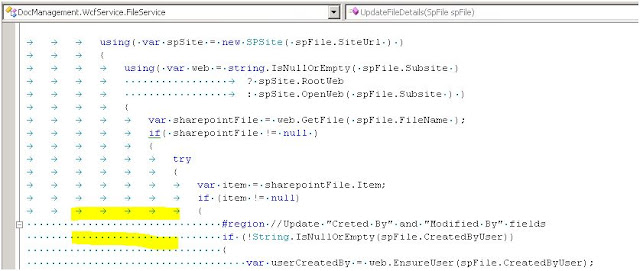
Sometimes you could see arrows(=tabs) and dots(=spaces) in your Visual Studio Editor. Now the nice question is how to remove them...? If you do search over the options you probably will not find a way how to do that. The solution is simple but hidden. Just press CTRL R CTRL W in your Editor. That's it.
This is interesting book and it was written by Roy Osherove, he is chief architect on Typemock Isolator product. Despite that fact the book is very balanced (I didn't expected that, but it really is) and it covers probably all open-source testing frameworks available up to the date. It is very valuable source of information with regard to software development. In particular I like how each library is described, compared and strong/weak points are presented. So this is a place there all the best practices are presented in one place. I should not say that the book also describes the reasons why do we need to do unit testing, how to do it correctly, common mistakes and some recommendations on how to apply TDD style in your enterprise. If you are new to such concepts as SOLID, IoC frameworks, Mocking - here you can find great examples of these techniques. To sum up, I think this book deserves 4.5/5. It is not very thick, so you'll be able to read it in a couple of days and ...
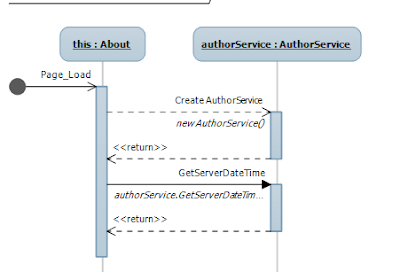
In this article I will introduce you to the UML Sequence Diagrams. UML, as you now stands for Unified Modeling Language. So why sequence diagrams can be useful? Recently I have been working on legacy project. And sequence diagram can really help you to figure out the application calling sequence. Let's take this piece of code. public partial class About : System.Web.UI. Page { protected void Page_Load( object sender, EventArgs e) { var authorService = new AuthorService (); this .Title = authorService.GetServerDateTime().ToString(); } } I believe that one picture is better that 100 words. So here is the same code but in UML Sequence Digram. Simple UML Seque...

Comments
Post a Comment